How to Write Great Product Specs
Your product specs just got a massive uplift in style and function.Gone are the regular ol’ textboxes (along with their skeuomorphic legal pad lines and coffee stains), and in their place are gorgeous and super slick rich editing fields powered by Redactor.
We now offer you a whole host of editing options that will allow you to shape your product specs exactly as you need.
Most importantly, you want your specs to get read, and key to that is using the right tools to write effective product specs.
Here’s a quick guide to writing an effective ‘Brief’ to kick off your product spec:
Writing an awesome product spec brief
Now that you’ve got the tools to hand, it’s time to flesh out your ideas into product specs that your entire team can get along with.
Your starting point is a one-liner idea.
In order to get stakeholder buy-in and the official ‘Go’, you’ll need to go into a little more detail.
Introduce your plans.
Start off with a quick one or two sentence paragraph outlining what the product spec will cover and why you’re doing it.
Split it up.
Break your specs into distinct sections, using headers to highlight the different levels, and horizontal rules to break up major sections.
At a glance, anyone looking at your brief should get the gist of what you cover in each section of the spec.
Bullets are better.
Where you’ve got a list of options or requirements, putting these into bullet points or a numbered list can do wonders for actually getting your specs read.
We all skim when we read, and you can be sure that some of your specs are being skimmed if you don’t make it easy to digest.
Emphasis can be good.
If something needs to stand out, feel free to add some bold or italic styling. Heck, you can even add some color. Whatever you do, make sure you’re emphasizing the right bits, you’re using it sparingly, and you don’t use all capitals (unless you’re @FAKEGRIMLOCK)… No one likes getting shouted at!
Give it some personality.
Don’t be afraid to add some spice in your specs! Half the fun of writing a product spec is getting to make up fake data and copy to illustrate your point. If it’s easier, personify the user you’re looking to help with your product spec and give them a fun name or profession.
A little tech is okay.
If you know exactly what needs to be looked at in the codebase, feel free to include a snippet or two of code to illustrate your point.
However, at this stage, don’t dictate the exact solution unless it’s blatantly obvious and the only solution. As you work through your specs with your team, you might find a better way!
Keep it brief.
Write as much as you need, and never any more! It’s entirely too easy to get really into the details early on in this spec’ing process.
Link it up.
Add links to relevant pages where needed. This is easy with the new text editor, whether it’s a link or an email you wanted to include.
In ProdPad, you can link to another idea simply by typing # then the Idea ID, and it’ll create the link for you. For example, if your spec needs to refer to IDEA 142, just type “#142″ and the link will appear when you save. Note: This also works in comments throughout ProdPad, so get linking!
The new text editor in ProdPad is miles ahead of where our last one was, and should make your life much easier as you write out your specs. It’s mobile friendly, super robust, and ready to use today.
Got some inspiration for your own product specs? Start a free trial now!
We’re always pushing new updates to make ProdPad better and better. If there’s something you’d really like to see, don’t hesitate to get in touch at hello@prodpad.com.
The post How to Write Great Product Specs appeared first on ProdPad - Product Management Software.
Ask A Product Manager: Effective Product Roadmaps
My question is what have you used to create and maintain the roadmap, and in your experience are there any good resources like sites or books where I could really learn more?
I’ve done searches and find lots of very high-level visuals, but I’m not sure that that is the correct way or whether it should be more detailed in nature. I’d like to gain a better understanding and learn the most effective way to present and maintain the data.
The prior company I worked for never really paid much attention to it – I did it more for myself – but our roadmap really consisted of a huge bug list and new features that I just managed based on our development schedule. So I mainly used Word and created a table with quarters and listed the main features (and larger bugs) per quarter I wanted to get developed, and called them new releases, and adjusted it along the way based on what didn’t get developed and executive non-rational decision making.
I certainly feel your pain! I have also had roadmaps that are overrun by bugs and feature requests. It took me a long time to figure out what was going wrong, because - inevitably – the roadmap would slip as it’s impossible to plan to that level of detail on an 18-24 month horizon in a single document.
First up, stop thinking of your roadmap as a Gantt chart. It’s an easy mistake to make because so many product managers use project management tools or techniques to make their roadmap. My ProdPad co-founder, Simon Cast, wrote about this - Don’t use Project Management Tools for Product Management
Think of your roadmap as a strategic communication document. Its purpose is to show your team and other stakeholders what your product vision is and what the high-level initiatives will be to get there. It’s not a device for showing off every last nook and cranny of your development plan, and doesn’t need to include your list of specific bugs or minor features you want to get out the door.
Now, realistically, as a product manager, you probably do have a list of bugs and little items that need to be addressed and moved through development. This is fine, but remember that at that point (when you’re helping the development team move items in and through their Kanban/Sprint/Backlog/whatever), you’re playing the role of a project manager or product owner rather than the product manager. The roadmap is a product management document and should live separately.
Leave out the dates. You don’t know what the expected delivery dates are for anything that goes beyond a couple weeks – ie the length of a sprint, or however long ahead your team specifically plans out as a distinct project or deliverable – and so you shouldn’t fake it! Putting a date on a roadmap, even if it’s vague like ‘Q3 2013′, will more often than not end up setting expectations you don’t deliver on and cause undue stress and finger-pointing among various stakeholders. While ideally, as the awesome product manager that you are, you’d like to think that you can put a rough estimate on something and stick to it, your estimates suck (from a great book called Rework I recommend everyone reads!). You don’t know what bugs are going to creep up and change your plans, and even if you did, by the time you get to ‘Q3 2013′, your product strategy might need to adapt and change based on what’s going on in the market, your users, your competition, etc.
Think of your roadmap as a guide, intended to keep everyone aligned and in the loop, but not as a strict project plan. As Steve Johnson said here: “I’m okay with sharing the roadmap… as long as clients and sales people know that the roadmap is a plan and not a commitment.”
As for other great resources, there’s some really smart people you can follow:
- Steve Johnson’s just published an ebook all about roadmaps.
- Marty Cagan is hugely respected in the industry and always has me nodding along to his articles. Here’s some good stuff by him on roadmaps.
- Martin Eriksson (hat tip for introducing me to the concept of roadmapping without dates) founded ProductTank events for product managers and knows his stuff. He’s written a very useful article on prioritising.
- And finally, there’s MindTheProduct.com, where a bunch of other smart product people write. Here are some posts about roadmapping.
Ask a Product Manager is a new series of articles based on great questions and answers given by product managers. Got a question of your own? Ask away: ask@mindtheproduct.com
The post Ask A Product Manager: Effective Product Roadmaps appeared first on MindTheProduct.
Roadmap versus Release Plan
The post Roadmap versus Release Plan appeared first on ProdPad - Product Management Software.
Integrate with JIRA, Trello, and Pivotal Tracker
ProdPad integrates directly with JIRA, Pivotal Tracker, and Trello
Great news for fans of JIRA, Pivotal Tracker and Trello!
You can now push your finished product specs or user stories directly to your favorite project/task management tool using our direct integration. No more copying and pasting to get your product specs into the hands of your developers.
Why these integrations?
Our goal is to make the lives of Product Managers and their teams easier. We know that our users are already using a variety of project management, development management, and task management tools. ProdPad helps teams decide which projects or development tasks need to be worked on next, so it was a natural progression to allow an idea in ProdPad to be pushed directly to a project management tool so development can take it from there.
Transparency in Development
While the immediate benefit of these integrations means that you no longer need to manually copy over a finished spec from ProdPad into JIRA, Trello, or Pivotal tracker, it does more than that.
Your development team will always work best if they know why they are building out a specific feature. They need to know what problem they are solving, and what impact it’ll have on the company.
Because ProdPad pushes through a record of the product spec as well as a link back to the original idea, your developers using JIRA, Pivotal Tracker or Trello will be able to track back a request to it’s core. Who requested it (was it the CEO or a client?) and what was their original intention?
This will help ensure your devs are building the right thing and know who to ask if the spec isn’t clear.
Transparency in Business
Your sales team is a great source of new ideas, and so is your marketing team, your support team and even your CEO. However, when they tell you a great new idea, they usually have no way of knowing where it ended up.
With a direct integration set up, they can see whether it landed in Trello, JIRA, or Pivotal Tracker to be worked on by the development team, or whether it’s still sitting in ProdPad waiting for a little more feedback.
Keep your team in the loop from end-to-end by integrating ProdPad with your development tool.
What are you waiting for? Start your free trial today!
API and more integrations
While JIRA, Trello and Pivotal Tracker are our first direct integrations, we’re on the lookout for new integration ideas. Our API is being built out for developer access, and we’re open to suggestions on what else you’d love to see ProdPad integrated with.
Get in touch at hello@prodpad.com if you’ve got a particular integration in mind.
Using a different tool?
If JIRA, Pivotal Tracker and Trello aren’t your bag, don’t worry! We might already have you covered with our Zapier integration! Have a look at their full list of integrations available, now up to more than 240 3rd-party services you probably already use.
The post Integrate with JIRA, Trello, and Pivotal Tracker appeared first on ProdPad - Product Management Software.
Roadmap transparency
As a company who builds tools to build product roadmaps, we’re pretty open about our own roadmapping processes.
Additionally, because our users are product people like us, we’re pretty comfortable sharing what’s on our roadmap.
Being so transparent and communicative with our users has proven to be hugely helpful in setting our direction and understanding what we need to be building and improving on.
About the ProdPad roadmap
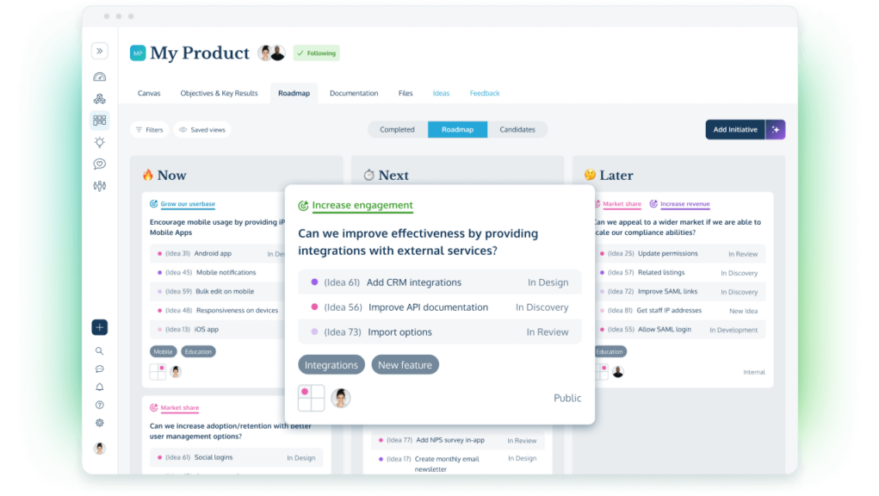
If you’re not familiar with a lean product roadmap, the first thing you might notice is that we have no promises of dates on our roadmap. Instead, we’re using the roadmap as a strategic communication tool, showing high-level areas we’re going to be tackling, structured in relative priorities as they relate to Current, Near term, and Future plans. We’ve talked a lot about Roadmapping without Dates before, and we find this method to be the best mix of articulating product direction without getting stuck in the details.
Without further ado, here’s a snap of our current roadmap:
In the future, you can always find the latest version of our roadmap at http://www.prodpad.com/our-roadmap/. Your feedback is always more than welcome – get in touch at hello@prodpad.com.
Naturally, we’ve created this roadmap using our own product roadmap tool, and captured using our export product roadmap feature.
The post Roadmap transparency appeared first on ProdPad - Product Management Software.
Paving the Cowpaths – Log in how you like

Desire lines based on user behavior in ProdPad
People were resetting their passwords a lot, sometimes two or 3 times in a row. We couldn’t figure out why people were struggling to get in, but when we looked a little deeper, we realized that a good 30% of users were logging in with their email address.
Now, what’s wrong with that, you ask?
It turns out that some flip decision we made in the early days of ProdPad resulted in us requiring the use of a username instead of an email for logging in. For a while, we thought nothing of it, until we started seeing the pattern and it’s effects.
When we saw the 30% figure, our eyes bulged: We were kicking off error messages for nearly every third person who came back to use ProdPad, and in many cases, losing their attention as they got stuck into the ‘Reset Password’ flow.
We had a couple options:
1) Make it clearer that the username is to be used at login, not the email address.
OR
2) Pave the cowpath.
We decided to pave the cowpath.
Desire lines in User Behaviour
A (traditional) cowpath is the line in the grass that cows make as they forge their way through the field in a particular route. A herd of cows, like your users, will try to take the easiest path they can see, even if it means trampling the grass or cutting corners.
It leaves you with an unsightly line in your lawn… or in our case, unsightly drops in usage at the point of logging in! The path that they choose to take, in UX terminology, is often called a desire line or a cowpath.
Paving the cowpath, then, refers to changing or improving your app design to allow people to go the direction they were trying to go anywhere. Don’t penalize your users! Instead, help them get to where they wanted to go with as little hassle as possible.
Finding a Desire Line
If a user gets something wrong, I generally assume it’s something wrong with the app, not with the person.
In our case, even if the login page was technically working to spec, it still wasn’t right. It wasn’t working in a way that users were able to use consistently and without error, and so we took the approach to assume it needed to be updated.
Never underestimate the power of adding a little bit more tracking, as it proved very useful when it comes to troubleshooting. In our case, we used Papertrail to dig through the log files and ping us when something went wrong.
From there, it was just a little pattern recognition and common sense (the type of thing Product Managers are great at!).
Following the fix, we’re seeing significantly fewer login errors, fewer customer inquiries about login issues, and have freed up a chunk of time to focus on finding and improving other metrics.
Have you ever found and paved a cowpath? Let us know in the comments!
The post Paving the Cowpaths – Log in how you like appeared first on ProdPad - Product Management Software.
Dine and Pitch with an MTPcon speaker
In association with General Assembly, we’re offering you the chance to meet George Berkowski, Head of Product at Hailo and one of the speakers at our Mind the Product 2013 conference.
Dine and Pitch
Enter for a chance to pitch your startup idea and get a ton of product feedback from London’s top product pros over a private dinner at Duck and Waffle.
Enter your 140 word pitch by April 21st.
The Prize Package
One lucky winner will receive:
- A private dinner and pitch session with George Berkowski (Head of Product, Hailo), Janna Bastow (Co-Founder, ProdPad) and Kate Leto (Instructor, General Assembly)
- Two free tickets to an upcoming Product Management Workshop at GA London, taught by Janna Bastow.
The Pros
Janna Bastow
Co-Founder of ProdPad, Writer at Mind the Product
@simplybastow
George Berkowski
Head of Product at HAILO
@georgeberkowski
Kate Leto
Product & Marketing Consultant, General Assembly Instructor
@KLeto
The Venue
Duck & Waffle
Head Chef Daniel Doherty
@DuckandWaffle
Located on the 40th floor of the Heron Tower, Duck & Waffle made its debut in the London restaurant scene in the summer of 2012. Inspired by broad European and British influences and spirit, the restaurant’s vibrant atmosphere encourages a convivial experience for guests through its array of dishes designed for sampling and sharing. Head Chef Daniel Doherty places emphasis on local, rustic, seasonal and sustainable British ingredients, manifested in daily inspirations created from the market’s freshest offerings.
Full details at General Assembly
The post Dine and Pitch with an MTPcon speaker appeared first on MindTheProduct.
Want to meet in San Francisco?

Come meet us in San Francisco!
Check your calendar
If you’re in town on Tuesday, April 9th, there’s a ProductTank event happening. Come for a free round of drinks and a chance to chat with a bunch of other product people. RSVP for ProductTank
If Wednesday works best for you, there’s another meetup where Simon will be demoing ProdPad and talking about where we’re taking future development. RSVP for StartupProduct
Coffee (or a drink!) on us, any time
Regardless, if you’re in the area, we’d like to meet you! Get in touch for a coffee or a drink at simon@prodpad.com.
We’re happy to demo ProdPad to your team, give product management advice, or just generally chat. Let us know when works for you!
Not in San Francisco?
Meet us in your city! Find out where we’ll be next
The post Want to meet in San Francisco? appeared first on ProdPad - Product Management Software.
Introducing the Auto Roadmap Tool – Product Management Automagic!
The ProdPad development lab has been hard at work to make life easy for Product Managers. We know that the hardest part of any product management role is determining exactly what should be built and when, compiling that knowledge into an easy-to-understand product roadmap, and then getting everyone to buy into the latest roadmap updates.

Drag and drop and clear columns made ProdPad’s earlier version of their Product Roadmap tool simple to use and very effective.
Our earlier versions of the product roadmap tool were designed to help communicate to your team and to other stakeholders what was coming up in the product development pipeline. It allowed a Product Manager to link their roadmap to their product backlog, mapping their development work to Current, Near term, and Future initiatives.
And while it was easy to use for any Product Manager, allowing them to build a product roadmap and share it with their team, we wanted to make it even better…
The Roadmap that Builds itself
We now take your backlog of ideas, and with highly advanced big data crunching algorithm technology, automagically render a complete and accurate product roadmap.
The predictive technology will set in place an accurate picture of what your development team should be working on now, and in the future, with a higher degree of certainty than ever presented in a product team before.
Our technology finally captures what product managers around the world never thought possible.
Gain buy-in from ALL stakeholders
The Auto-Roadmap Tool not only builds itself, but also covers for the hardest part of the Product Manager’s job: Getting complete buy-in from your team.
Upon completion of the roadmap, ProdPad’s Auto-Roadmap Tool will email each of your important stakeholders, informing them of the important roadmap updates that have been put in place and gently letting them know which of their suggestions and requests have been ignored left out. It does this using advanced natural language processing and AI, processing their initial request, comparing it to the product specs and your company’s product vision, and compiling an automated tailored response to each of your team members, clients, and Board members who’d otherwise question the new roadmap.
We set out to change the face of product management, and to finally build that tool that every product manager was waiting for – something to create their product roadmap and garner buy-in while they worked on the important things… like setting the Product Vision and finding the best flat white in town. – Simon Cast, ProdPad Development Lab
We’re proud to announce this technology today, and will be rolling it out to our users in the coming days. Make yourself an account today, and subscribe to our newsletter to get the latest updates.
Update: As a bunch of people correctly guessed, this is an April Fool’s joke! While the idea of a tool that *automagically* creates a roadmap with no input sounds like it might make everyone’s lived easier, it’s simply not possible…. yet! In the meantime, we’re providing tools to help you understand where your product needs to go, what the relative priorities of various ideas and feature requests are, and put it together in a simple drag and drop product roadmap.
The post Introducing the Auto Roadmap Tool – Product Management Automagic! appeared first on ProdPad - Product Management Software.
Embrace the Inconvenient Truths of Product
Marty Cagan recently wrote about his frustration with the all-to-common process of creating product roadmaps, the process of painstakingly putting together a ‘plan’ for the coming months and quarters, signed off by a vast set of stakeholders.
His article on the Inconvenient Truths of Product resonated with us, as he outlined two very good reasons why this style of roadmapping simply doesn’t work:
“The first such truth is that at least half of our ideas are just not going to work.”
“If that’s not bad enough, the second inconvenient truth is that even with the ideas that do prove to be valuable, usable and feasible, it typically takes several iterations to get the implementation of this idea to the point where it actually delivers the expected business value.”
As we’ve mentioned before, our previous version of the product roadmap tool was built with the intention to help organise these ‘old style’ roadmaps, quarter-by-quarter, month-by-month, on a feature-level granularity. We got that all wrong.
Last year, we released a new version of the roadmap that suits us and our users much better. It throws out the notion that your roadmap needs to be so granular, and accepts the uncertainty that will always exist when building a product.
Marty Cagan very accurately sums up those two inconvenient truths and urges product teams to embrace them.
The ProdPad Roadmap Tool is designed with these facts in mind, with the goal of helping you embrace the fact that you don’t know exactly what should be in your long-term product plans. We want you to remain flexible while still providing your team with a sense of product direction. As a result, our roadmap software features the following:
- Three columns: Current, Near term, and Future
You can rename these if you wish, but they are purposely given high-level, non-date-specific titles so as not to imply promises of delivery that just aren’t certain. However, they still provide your team with the insight they need to keep moving in the right driection. - Time versus Certainty axes
A concept for roadmaps we first heard about at a talk at ProductCamp London, organises your roadmap items by time and by the likelyhood that you’ll get to them. Drag and drop roadmap cards across columns or above and below other cards to build out and update your roadmap. - High-level ‘Roadmap Cards’ instead of features
Features are simply too granular and likely to change, and just end up cluttering the roadmap. Rather, with the ProdPad roadmap creation tool, you create Roadmap Cards, which represent high-level chunks of work to be completed. These are less likely to change on a weekly basis, and allow you to associate any number of ideas or features to the cards, giving you that crucial link to your product backlog.
Are you embracing these inconvenient truths and changing your roadmapping habits? We’d love to get your feedback. Get in touch at hello@prodpad.com any time!
The post Embrace the Inconvenient Truths of Product appeared first on ProdPad - Product Management Software.